
Automated lead follow-up when inboxes wander off
A lead rarely goes cold on its own. In Dubai, the UAE, Liverpool or the UK, plenty of service businesses lose good enquiries in the gap between a contact form, a shared inbox and a busy person who meant to reply after one more call. That is usually where the fun starts.
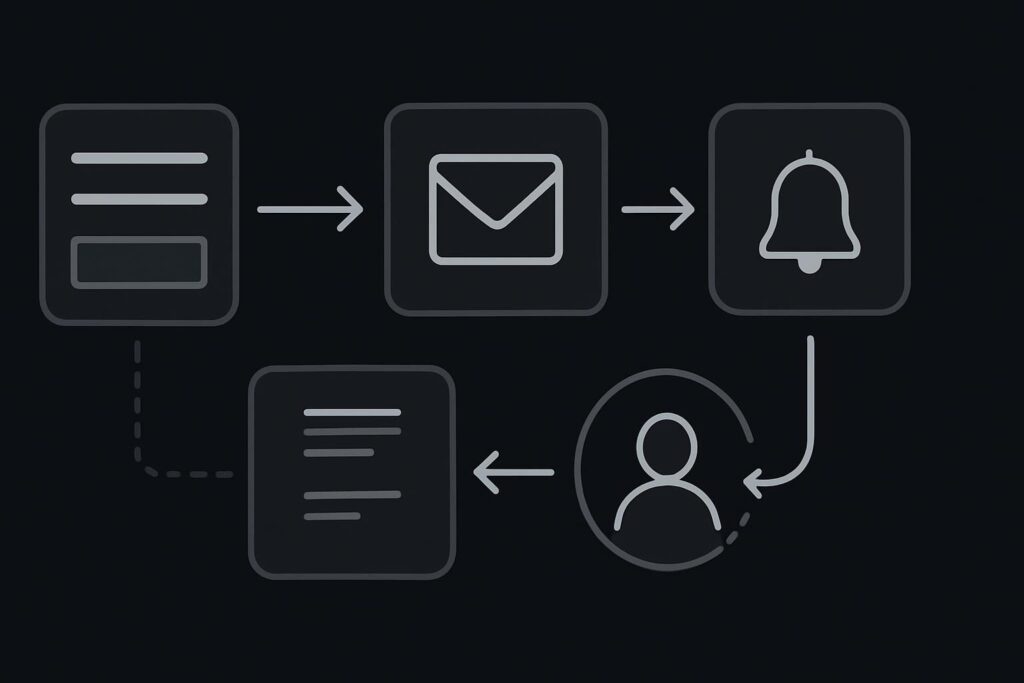
Automated lead follow-up is the process of checking, recording, acknowledging, routing and reminding after a website enquiry arrives. It does not need to replace human judgement. A sensible workflow confirms the form was received, logs the enquiry, alerts the right person, sets a follow-up reminder and flags unusual or sensitive messages for manual handling.
The 4:47 pm enquiry nobody owned
Picture a normal Tuesday.
A prospect fills in your website form at 4:47 pm. They have read the service page, checked a couple of case studies, decided you look credible enough and sent a message asking about availability.
The form displays a polite success message. Lovely. The visitor assumes someone has it.
Behind the scenes, the enquiry goes to a shared inbox. No automatic acknowledgement goes to the prospect. No CRM record is created. No owner is assigned. No reminder is set. One staff member sees the email preview, gets pulled into a call, and plans to come back to it.
They do not.
The next morning, someone finds the message. By then the prospect has contacted a competitor who replied in ten minutes with a clear next step. Your team says lead quality is poor. Not ideal.
The false assumption: a form plus inbox is a process
A contact form and an inbox are not a lead-management process. They are a delivery route. Sometimes not even a good one.
A form can say thanks while the email fails because SMTP is misconfigured. A shared inbox can receive the enquiry but hide it under newsletters, supplier messages and internal replies. A CRM can exist but only work when someone remembers to copy the enquiry into it.
The plugin might be guilty. It might also just be standing closest to the scene of the crime.
Most lead follow-up failures happen between systems and people, not because nobody cares. The enquiry depends on whoever notices it first and remembers what to do next. That is too fragile for paid traffic, referral traffic or any service business website that depends on trust.
A better automated lead follow-up workflow
The goal is not to build a dramatic new system nobody uses. Start with the boring route a real enquiry should follow from website form to actual response.
| Step | What should happen | Why it matters |
|---|---|---|
| Form submission | The form captures the required fields and validates obvious errors before sending. | Bad form setup creates missing phone numbers, vague messages and dead ends. |
| Delivery check | The message is sent through reliable email delivery, often using SMTP rather than default server mail. | A success message on the website does not prove the email reached the inbox. |
| Customer acknowledgement | The prospect receives a short automatic reply confirming the enquiry was received. | It reduces doubt and sets a basic expectation without pretending a human has reviewed it. |
| Log the lead | The enquiry is added to a CRM, spreadsheet or lead tracker with date, source and service interest. | The business can see what arrived, even if an email gets buried. |
| Notify the owner | The right person gets an alert by email, app notification or internal channel. | Shared ownership usually means no ownership. |
| Set a reminder | If no one marks the lead as handled, a reminder is triggered after an agreed period. | Busy afternoons stop being a single point of failure. |
| Human escalation | Sensitive, unusual or high-value enquiries are flagged for manual review. | Automation should not make judgement calls it is not qualified to make. |
This is the sort of practical workflow covered in Standish Services business automation services, where the work is less about shiny tools and more about removing the daft gaps where enquiries disappear.
What the website needs to do first
Before adding automation, check that the website itself is not making the enquiry harder than it needs to be.
- The form should ask for enough detail to qualify the enquiry, but not so much that people abandon it.
- The success message should explain the next step, not just say the message was sent.
- The notification email should include the service requested, page source where possible, phone number, email address and message.
- The reply-to field should be set correctly so staff can respond without copying and pasting addresses.
- Spam filtering should be checked. A lead in junk is still a missed lead.
- The mobile form should be tested on an actual phone, especially if the site uses popups, sticky buttons or multi-step forms.
One dull but useful test: send a form submission from your phone using a non-company email address. Then check what the prospect sees, what the team receives and where the enquiry is recorded. Do not assume. Test it.
If your WordPress setup is unreliable, old or patched together with plugins added during various panics, follow-up automation may expose the mess rather than fix it. Regular checks through WordPress website maintenance in Dubai can help keep forms, plugins, email delivery and basic tracking in a healthier state. Maintenance is boring until it is the only thing that saves the site.
Where automation should stop
Automated lead follow-up should not pretend every enquiry is the same.
A simple booking request can be acknowledged, logged and assigned automatically. A complaint, legal issue, medical query, partnership proposal or sensitive commercial enquiry should be routed to a person with enough context to handle it properly.
Good rules might include:
- Send urgent support requests to a support owner, not the general sales inbox.
- Flag messages containing words such as complaint, refund, legal, media or partnership.
- Route location-specific enquiries to the right Dubai, UAE, UK or Liverpool contact.
- Keep a manual review step for enquiries with attachments or unusual requirements.
- Do not let an automated reply make promises on pricing, timings or availability unless those details are genuinely controlled.
The best automation removes avoidable delay. It should not remove accountability.
The smallest sensible fix
You do not need to start with a new CRM. You need to know what currently happens.
- Submit a test enquiry from the website.
- Check whether the customer gets an acknowledgement.
- Check who receives the internal notification.
- Check whether the enquiry is logged anywhere outside the inbox.
- Check whether anyone is responsible for replying.
- Check what happens if that person is busy, off sick or in meetings.
If one good lead can disappear because one person had a busy afternoon, the process is too fragile. Fix that before paying for ads, rebuilding your website or blaming the market.
FAQs about automated lead follow-up
What is automated lead follow-up for a website?
Automated lead follow-up is a set of rules that runs after someone submits a website form. It can send an acknowledgement, log the enquiry, notify the right person, create a reminder and flag exceptions. It should support human follow-up, not replace it entirely.
Do Dubai service businesses need a CRM for lead follow-up?
Not always. A CRM can help, but a small Dubai service business may start with a well-structured sheet, clear ownership and reminders. The key issue is whether every enquiry is captured, assigned and followed up consistently. A CRM without rules is just another place to forget things.
Can WordPress contact forms trigger automated follow-up?
Yes, many WordPress contact forms can connect to email acknowledgements, CRM tools, spreadsheets and notification systems. The setup needs testing, especially email delivery, spam filtering, reply-to fields and mobile form behaviour. A form success message alone does not confirm the workflow works.
How quickly should a website enquiry be acknowledged?
An automatic acknowledgement should usually be immediate, because it confirms the enquiry was received. The human response time depends on your business, service type and working hours. What matters is setting a realistic expectation and making sure the enquiry does not sit unnoticed in a shared inbox.
Should unusual enquiries be automated?
They can be logged and routed automatically, but they should often be reviewed by a person. Complaints, sensitive requests, legal concerns, medical topics, high-value proposals and unclear messages need judgement. Automation is useful for moving the enquiry to the right place, not for making every decision.
If missed enquiries are becoming a pattern, start small. Message Standish Services on WhatsApp to Map what currently happens after an enquiry and identify the step most likely to be missed.